Custom Alerts
Let me know. I decide what happens next.
Follow prices, wallets, and market activity. Receive the update, then make your own move.
Choose the moments that deserve your attention. Set the conditions for your next move.
Let me know. I decide what happens next.
Follow prices, wallets, and market activity. Receive the update, then make your own move.
My plan. My conditions. Set in advance.
Choose Limit, Stop Loss, or DCA. Review your terms and sign the order from your wallet.
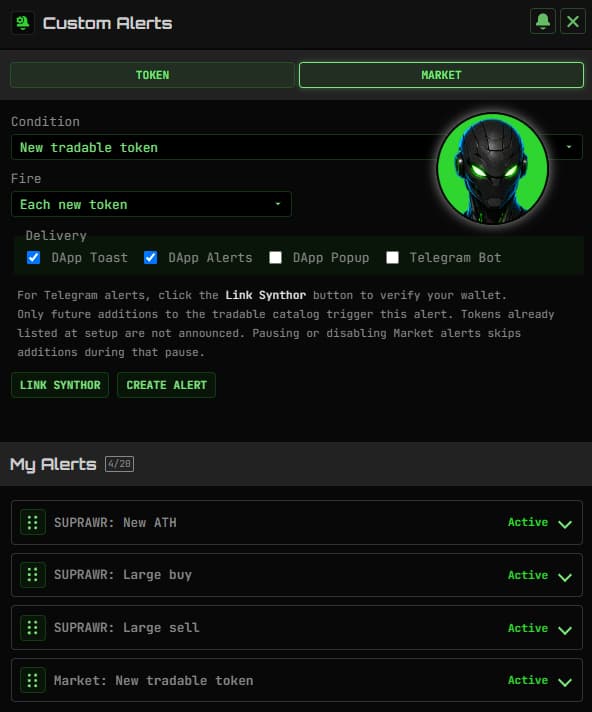
You do not need to watch every chart. Custom Alerts monitor the conditions you choose and bring the updates to you, in Synthwav or privately through Synthor in Telegram.
Set a USD price target, follow percentage moves, or watch for new recorded all-time highs and lows. Choose a price level directly on the chart to start an alert.
Watch large buys and sells, or follow a specific wallet trading your selected token. See the activity that gives you a reason to take a closer look.
Follow moves across My Faves, discover newly tradable tokens, or watch for TIP verifications and published metadata updates.
Choose your price.
Set a target for a buy or sell instead of accepting the current market price. Choose your amount and expiry, then review the order before signing.
Plan your exit.
Set a sell trigger and the lowest price you are willing to accept below it. Available on supported routes, with your minimum received shown in the review.
Build over time.
Split a SUPRA budget into scheduled buys. Choose the number of buys, an hourly, daily, or weekly interval, and a maximum price per buy.
Link your wallet to Synthor and receive selected alerts in your private Telegram chat. Create, edit, and pause the same rules you manage on Synthwav, without opening another dashboard.
Jump from a notification to the token's Trade screen, chart, or TIP when you want a closer look.
Connect your wallet and open Custom Alerts or choose an available order type in Trade. Start with the token and condition that fit your plan.
For alerts, choose the trigger, repeat settings, and delivery channels. For orders, choose your amount, target, and the schedule or expiry shown.
Review before saving an alert or signing an order. Manage saved alerts, and use My Orders to inspect open and past orders or cancel an open order.
An alert sends a notification when its monitored condition is detected. It never places a trade. An order is a transaction you sign to set trading conditions with the WARs order contract.
Telegram alerts are evaluated and delivered server-side after you link Synthor and enable Telegram delivery. Submitted orders live on-chain; keeping the page open is not what executes them.
You can edit, pause, resume, or delete your alerts. My Orders lets you cancel eligible open orders or reclaim funds from eligible expired orders. A trade that has already filled cannot be undone.
The order review shows contract fees, Synthwav fees, and any refundable deposit before you sign. Network gas also applies. DCA fees are shown per buy; the final review reflects the current settings.
Available order types depend on your access and current feature settings. Orders require supported token routes, and Stop Loss has additional route requirements. Orders can remain unfilled when their conditions or available liquidity do not allow execution.
Yes. Link your wallet with Synthor, then send /alerts to create and manage the same wallet-owned rules you see on Synthwav. Telegram delivery must be selected for each alert you want to receive there.