Watch The Price
Set a USD price target, follow percentage moves, or watch for new recorded all-time highs and lows. Choose a price level directly on the chart to start an alert.
Follow token prices, wallet trades, and market activity. Let Custom Alerts and Synthor bring the updates to you, on Synthwav or in Telegram.
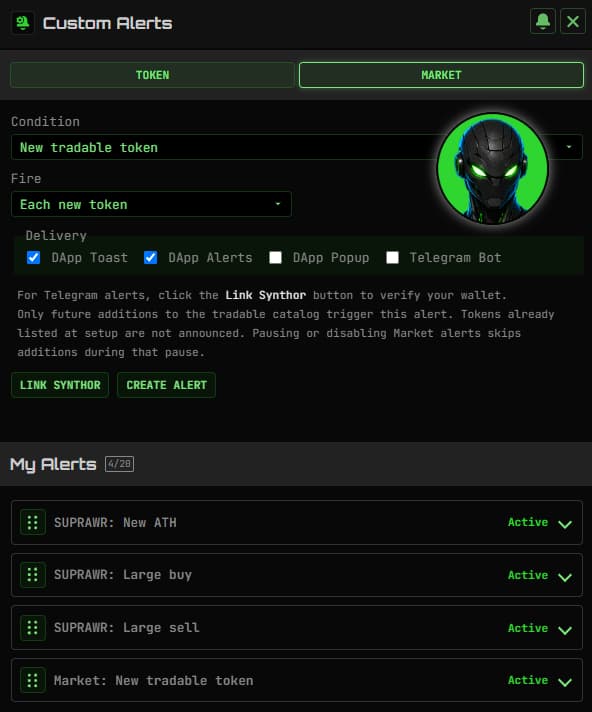
You do not need to watch every chart. Custom Alerts monitor the conditions you choose and bring the updates to you, in Synthwav or privately through Synthor in Telegram.
Set a USD price target, follow percentage moves, or watch for new recorded all-time highs and lows. Choose a price level directly on the chart to start an alert.
Watch large buys and sells, or follow a specific wallet trading your selected token. See the activity that gives you a reason to take a closer look.
Follow moves across My Faves, discover newly tradable tokens, or watch for TIP verifications and published metadata updates.
Link your wallet to Synthor and receive selected alerts in your private Telegram chat. Create, edit, and pause the same rules you manage on Synthwav, without opening another dashboard.
Jump from a notification to the token's Trade screen, chart, or TIP when you want a closer look.
Connect your wallet and open Custom Alerts. Follow a token, your favorites, or the market, then choose the condition you want to monitor.
Choose your trigger, repeat settings, and delivery channels. Link Synthor if you want private Telegram notifications while Synthwav is closed.
Review before saving. Edit, pause, resume, or delete your alerts on the website or in Telegram as your interests change.
Supported conditions include price targets, percentage moves, new recorded ATHs and ATLs, large buys and sells, and watched-wallet trades. My Faves and Market rules cover supported conditions across multiple tokens. Available options depend on current feature settings.
Telegram alerts are evaluated and delivered server-side after you link Synthor and select Telegram delivery. Browser toasts and popups run while Synthwav is open and visible; they are not closed-browser push notifications.
Yes. Link your wallet with Synthor, then send /alerts to create and manage the same wallet-owned rules you see on Synthwav. Telegram delivery must be selected for each alert you want to receive there.
No. Alerts notify you when a monitored condition is detected. You decide what to do next and confirm any trade separately in your wallet.
You can edit, pause, resume, reorder, or delete saved rules. Website and Telegram changes apply to the same wallet-owned alerts, and switching wallets changes which rules you manage.
Delivery depends on data freshness, evaluation, and the selected delivery channel. Alerts do not have a guaranteed delivery time. Missing or stale required data does not count as a valid trigger, and ATHs and ATLs refer to Synthwav's tracked price history.