Token Insight Profile (TIP)
Signal strength, not investment quality.
TIP isn't measuring investment quality. It's measuring the strength of the signals we've defined.
Based on measurable token fundamentals and available on-chain data. Not an investment rating.
Token research should begin with clear evidence, not guesswork. TIP (Token Insight Profile) brings important token information together in one compact, inspectable profile inside Synthwav Trade, so you can see what the defined signals and supporting data say about a token.
Each supported token receives a score out of 100 and a letter grade from A through F. The grade appears directly beside supported tokens in the advanced token selector and chart controls, keeping context close to the moment it matters, whether you're comparing assets, reviewing a chart, or preparing a trade.
Selecting a grade opens the full profile, where the score is separated into measurable factors. You see the data that contributed to the result instead of an unexplained opinion.
Where to Find TIP
TIP grades appear:
- Beside tokens in the standard and advanced token selectors, compare grades while choosing what to trade.
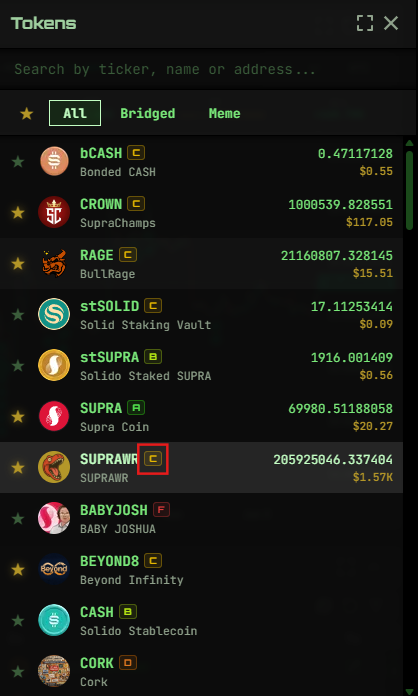
- In the chart controls, keep a token's profile in view while researching price action.
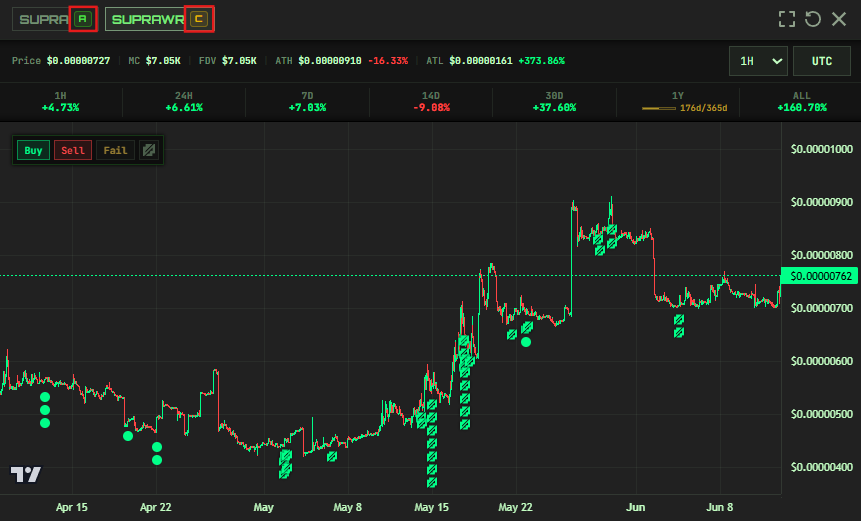
Select any grade to open the full profile and inspect the factor breakdown.
Share a token's profile with https://synthwav.io/tip/<CA>. Opening it loads that token's existing TIP modal; no wallet connection is needed to view the public profile. The Copy TIP link button in the modal header copies its direct profile link. Creator edit links remain separate at /tip/edit/<CA>.
The Score and Grade
A token's final score out of 100 determines its letter grade:
| Grade | Score |
|---|---|
| A | 80+ |
| B | 60+ |
| C | 40+ |
| D | 20+ |
| F | below 20 |
Confirmed Atmos Studio, WARs Floor, and Hoglet Launcher tokens show STDO, FLOR, or LNCR instead of a letter grade until graduation. Their total score and category scores remain visible. Graduated tokens receive the normal letter grade; tokens launched outside these platforms do not need a GRAD tag to receive a grade. Hoglet graduation requires confirmed migration to a DEX, not just completion of the bonding curve.
How TIP Scores a Token
TIP evaluates seven factors, each with its own maximum contribution to the total score. This is Token Score methodology version 4:
| Factor | Max Points | What It Measures |
|---|---|---|
| MC | 30 | (Market Cap) The token's current market scale |
| TVL | 20 | (Total Value Locked) Trusted-priced USD value in supported DEX pools and DeFi protocol deposits |
| Depth | 10 | Supported TVL relative to Market Cap |
| 7-day activity | 10 | Recent unique trade activity |
| Profile | 15 | A 40-character description, website, and additional distinct project link |
| Token age | 10 | How long the asset has been active |
| Ticker originality | 5 | Whether the ticker is the earliest supported launch using that symbol |
Market Cap carries the most weight because established market value is an important measure of a token's current scale. Liquidity is separated into Total Value Locked (TVL) and Depth so TIP can distinguish the amount of liquidity from how strongly that liquidity supports the token's size. Age and activity add market context, originality identifies duplicate tickers, and Profile measures whether users have enough public information to research the project.
Understanding the Factors
MC
Market Cap is calculated from the token's current price and the applicable market supply. Synthwav's registry accounts for token identifiers and paired Coin or Fungible Asset records when resolving supply, so Market Cap reflects the correct underlying asset.
TVL
TVL means Total Value Locked and measures trusted-priced USD value across supported DEX pools and DeFi protocol deposits. Current indexed sources include Atmos, Spikey, LeoEx, Dexlyn, and supported Solido Flow and Cash deposits. Higher TVL indicates more value supporting the token ecosystem, but protocol deposits are not necessarily available for immediate DEX trading.
Depth
Depth is calculated as TVL / Market Cap * 100. It shows how much supported locked value exists relative to the token's market size. Because TVL includes supported protocol deposits as well as DEX pools, Depth is an ecosystem-liquidity indicator—not a direct prediction of trade price impact.
Depth uses these scoring tiers:
- 10 points: 40% or higher
- 8 points: 20% to 39.99%
- 6 points: 10% to 19.99%
- 4 points: 5% to 9.99%
- 2 points: 2% to 4.99%
- 0 points: below 2%, or when the required data is unavailable
7-Day Activity
Activity counts unique token trade transactions recorded through Supra RPC during the previous seven days, a signal of recent participation beyond price movement.
Profile
Profile awards 5 points for each of three requirements, up to 15 points:
- A description containing at least 40 characters, after whitespace is normalized.
- A valid project website.
- At least one additional valid, distinct project link: a supported social platform, GitHub, documentation, or another project destination.
Extra links do not add more points. Duplicate destinations, including the website repeated under another label, do not satisfy the additional-link requirement. All token types use the same checks. Token Manager's Project Completeness bar uses the separate six-step Project Transparency checklist: claim, description, website, social link, one approved PDF, and one project wallet. Each step contributes one sixth (0%, 17%, 33%, 50%, 67%, 83%, or 100%). Project Transparency shows the remaining actions; the old Missing Token Data panel has been removed.
The editor shows a live character count and blocks new descriptions below 40 characters. Existing shorter descriptions remain readable and earn no description points. Regular TIP descriptions retain their 200-character ceiling; Floor retains its separate 256-byte on-chain ceiling. Existing paid Floor edits can still be recovered without another payment.
Token Age
Age uses an exact token creation date from RBB when available. SUPRA uses its mainnet genesis date. An admin date override takes priority; otherwise, tokens without a confirmed creation date retain the existing market-age fallback. Approximate creation dates and first-trade estimates do not replace that fallback. Confirmed dates are stored and age is calculated locally; unresolved tokens are checked again periodically.
Ticker Originality
Originality checks whether the displayed ticker is unique among the supported tokens in the current registry-backed list. This is useful because duplicate symbols can create confusion even when the underlying contract addresses are different.
Community Growth Fund (CGF)
Regular paid TIP metadata edit fees go directly to the Community Growth Fund. The CGF reinvests those SUPRAWR fees into community initiatives, rewards and incentives, ecosystem growth, contributor compensation, and new tools and integrations for the Supra ecosystem.
For regular TIP edits, 100% of the paid fee reaches the CGF. SupWars Floor on-chain metadata edits have a separate Admin-configured fee paid in SUPRAWR (default $10), split 80% to Synthwav's CGF treasury and 20% to SupWars. Network gas is separate. An applicable TIP free-edit exception waives the edit fee, not network gas.
CGF wallet: 0xed3614f90036c4619b4d150e2c96fc76480a1237215212aebfd86d073e55e61a
Coin, FA, and Wrapper Families
When Supra exposes the same underlying token through an original Coin, a framework-paired FA, or a verified wrapper FA, TIP presents them as one token family. The original asset is the canonical profile root, and an edit made through any listed member updates the shared family profile.
Authority always resolves from the canonical root. Owning or controlling a wrapper contract does not grant permission to edit the underlying token's TIP profile. Tokens without verified on-chain relationship evidence remain independent profiles, so existing FA-only assets and edits are not merged by symbol or name.
Token Claims
Every token can store up to eight labeled project links, including Website, in Synthwav's database. Select EDIT METADATA to edit the description and links inline in the main token panel. Use ADD LINK or REMOVE LINK, then SAVE METADATA to review and sign the change. Labels support 1–24 UTF-8 bytes; regular TIP links require HTTPS and allow up to 240 characters. Existing four-link profiles remain supported. The full list appears in public TIP profiles, edit history, and metadata-update alerts. Profile scoring uses the three metadata requirements above; Project Completeness uses the six Project Transparency steps. Neither requires all eight link slots.
To send a creator directly to their token's editor, share https://synthwav.io/token-manager/edit/<CA>, replacing <CA> with the token's FA metadata address. The link opens Token Manager with that token selected when the connected wallet has an authorized role. It does not unlock editing, start a claim, or request a signature. The /tip URL redirects to /token-manager; existing /tip?assetType=fa&token=... links remain supported, as do full-Coin-type links for legacy Coins.
The green circle checkmark badge means the token family has an active claim through Synthwav. The current canonical Authority, an active Token Steward, or an active Token Delegate can complete the appropriate signed challenge; a Synthwav registry administrator can also claim the family manually. The claim source and date are recorded. Delegate claims are separate from an Authority wallet signature and do not transfer authority. The badge is not a listing decision, project identity check, endorsement, or security audit.
The /token-manager management list shows only token families the connected wallet can manage as their current canonical Authority, active Delegate, or authorized Steward, including unclaimed and illiquid tokens. Administrator and Full Access settings do not expand this list. Eligible unclaimed projects show a CLAIM link. Selecting it opens that project's editor without refreshing the page or requesting a signature. The actual signing action is CLAIM NOW inside the editor; it rechecks the connected wallet's current authorization. Opening an editor link alone does not authorize a claim or expose an unrelated project's editor. Public TIP profiles and claimed badges remain viewable through profile links, Markets, and Trade without management access.
A claim applies to the canonical token family. A graduated Atmos pump token continues to use its original pump creator Authority, while verified Coin, paired-FA, and wrapper representations share the result. Wrapper ownership alone does not qualify. LP and pool tokens are not eligible for token claims.
Token Stewards
Some community-run tokens are maintained by people who do not control the token's on-chain Authority wallet. Synthwav's Token Steward system allows an approved community operator to keep that token family's TIP description, website, and social links accurate without presenting the Steward as the on-chain Authority.
An active Steward grant requires at least three community references recorded by Synthwav. Public profiles show a Steward Managed notice, but the reference identities remain visible only to Synthwav administrators. Steward edits are labeled in metadata provenance and edit history and never transfer or replace on-chain authority. Steward status itself does not add scoring points; like any published metadata edit, completing the description, website, and social presence can change the Profile factor.
Learn how approval, permissions, Authority precedence, and public disclosure work in Token Stewards.
Token Delegate
The current on-chain Authority can grant another wallet permission to maintain the token family's public TIP metadata without transferring on-chain ownership or control. Delegated edits are identified in metadata history, and access is automatically suspended if the token's Authority changes.
An active delegate can also claim that family's TIP profile through CLAIM NOW, with the delegate's grant checked again before completion. The claim source remains identified separately from an Authority signature.
Learn how Authority proof, permissions, revocation, and public provenance work in Token Delegate.
SupWars Floor Tokens
Floor tokens use their current SupWars on-chain creator, not TIP delegation or Steward permissions, for metadata edits and creator switching. Their TIP actions are Edit Metadata and Switch Creator. The Admin Floor switches control public availability; wallets in the TIP Full Access allowlist retain access when those switches are off. The Free Edit list waives applicable metadata, project-wallet and document-upload/replacement fees; it does not grant editing permission. All creator/recipient checks and applicable SupWars permissions still apply.
Update Floor Metadata
- Open Token Manager, select the Floor token, and connect its current creator wallet on Mainnet.
- Select EDIT METADATA. Update the description and links inline in the main token panel. Keep every link you want to retain: saving replaces the complete description and links list.
- Select SAVE METADATA. Synthwav checks the creator and obtains SupWars' authorization for the exact details. If SupWars trims whitespace, review the normalized details shown and select RESUME UPDATE to continue.
- Unless your edit fee is waived, approve the quoted SUPRAWR payment using the saved WARs fee target (default $10), split 80% to Synthwav and 20% to SupWars.
- Approve the SupWars on-chain metadata transaction in your wallet. Synthwav refreshes SupWars' short-lived authorization before this transaction.
- Synthwav verifies the confirmed transaction, its metadata-change event, and the current on-chain details before saving the full description and link list to its own database and updating TIP.
Everything happens on Synthwav; no permission visit to Floor is needed. The description is limited to 256 UTF-8 bytes, with at most 8 links. Link labels must be 1–24 bytes and HTTPS URLs 9–200 bytes. Name, symbol, and wallet logo cannot be changed.
Payment and metadata are two separate wallet transactions, not one atomic operation. If the metadata transaction fails or you stop after paying, keep the payment hash and resume the retained draft; do not pay again. Use the recovery fields if a submitted transaction's hash was not retained automatically. There is no automatic refund. If the creator, token family, or metadata changes before you finish, Synthwav stops rather than overwriting newer information.
Switch the Floor Creator
- Select the Floor token in Token Manager, connect the current creator wallet, and select Switch Creator.
- Select Check Creator Status, enter the new creator wallet, and select Review Creator Switch.
- If needed, sign SupWars' free, one-time approval for Synthwav creator transfers. This message signature happens on Synthwav; it does not move funds or transfer the creator role. Approval can be revoked on Floor and becomes invalid when SupWars removes the provider's Transfer permission or the creator role leaves that wallet.
- Review the recipient and SupWars' handover fee, then select Sign Creator Transaction and approve the offer in your wallet. The displayed SUPRA handover fee is a maximum spend limit; gas is additional. This fee is separate from metadata editing fees and is not refunded if an offer is withdrawn or never accepted.
- The recipient connects their own wallet on Synthwav, opens the same token's Switch Creator panel, and selects Check Creator Status → Review Acceptance → Sign Creator Transaction.
- Only after the recipient's acceptance confirms on-chain does the new wallet become the creator. The previous creator loses that control. Creator rights and future creator fees follow the new role; existing token locks stay with their owner.
The creator may withdraw an open offer using Withdraw Offer before it is accepted. A submitted transaction can be checked using the recovery hash field without sending another offer. Switching the creator is a real on-chain role transfer, not TIP delegation. Creator renunciation is not offered through Synthwav.
The WARs update USD target is editable in Admin > TIP > Fees > WARs Update Fee & Wallet Address using Update Cost. This app setting controls new quotes independently of the regular metadata fee. The payout wallet still updates on-chain. The 80/20 split stays unchanged. Important Info and Floor editor notices use the saved target; waived fees display the current discount.
Project Wallets
Current token creators/authorities, active delegates, and active stewards can publish labelled project wallets in Token Manager. Choose Add Wallets, enter its label and Supra wallet address, then choose Add. The Wallets panel sits below Docs and supports editing and removal. The public TIP modal displays the saved list with address copy and explorer links. Adding a wallet does not grant it editing access or prove ownership of that wallet.
An optional SNS name accepts a root name such as project.supra or a subdomain such as treasury.project.supra. Synthwav checks that the name is unexpired and resolves to the listed wallet before preparing the signed update, bypassing cached results. The entered name is saved with the token's project wallets; current verification is cached separately in Redis per name/wallet, shared across tokens and server instances for up to five minutes. Visible tables refresh when verification expires; opening or focusing a table reuses a still-valid result. No background scan runs for names nobody is viewing. Known domain or parent-domain expiration shortens the cache lifetime. A confirmed mismatch or expiration stops the name from displaying; a lookup failure shows Unavailable and retries. Redis outages fall back to unexpired local results or live verification. Leave the field empty to use the wallet's primary SNS name automatically, with the same target and expiration checks. Domain ownership can differ from the target wallet.
Project wallet updates use their own USD target, paid in SUPRAWR using a fresh quote. The owner can change it in Admin > TIP > Fees > Wallet Add Fee. The displayed price comes from the saved setting. Existing Free Edit waivers apply. Additions, changes and removals use this fee; regular TIP and Floor metadata fees remain separate. Network gas is additional.
Updates require the existing signed TIP claim and a verified fee event before saving. A paid update can be resumed after an interruption using its saved payment, without paying again. If the wallet provider does not return a hash, enter the existing payment hash before resuming. Project wallets are shared across the token's verified family and included in metadata history and metadata-update alerts. Floor token creators can manage this Synthwav metadata independently of Floor's on-chain description and links.
The Important Info panel groups network, metadata-edit fee, wallet-additions fee, document-upload/replacement fee, CGF wallet and API information in its first column, with the configured TIP information note in its second column.
Project Transparency
When you select a token in Token Manager, Project Transparency shows six action points. The accordion opens by default and uses the shared dApp expand/collapse animation. Its header keeps the completed count visible when closed.
| Action | Completion requirement |
|---|---|
| Token claimed | The token has been claimed through Synthwav |
| Description | At least 40 characters after whitespace is normalized |
| Website | A valid official website is saved |
| Social link | A valid supported community or social-platform link is saved |
| Documentation | At least one project PDF has received Admin approval; pending uploads do not complete this step |
| Project wallets | At least one labeled project wallet is published |
Select an unfinished action to see its explanation and open the relevant editor. Token claims, metadata edits, and project wallet additions continue to use their existing permission checks and workflows. Only the current Authority, active Delegate, or active Steward can submit documentation for a claimed token.
This checklist and the My Tokens Project Completeness bar use the same six checks. Progress sorting uses the same completed-step count. It is separate from the Token Score. Completing documentation or publishing wallets does not add points to the Token Score.
Submit Project Documentation
Use the Docs panel below the metadata editor, then select Add Docs. Its table shows the document label, PDF filename, review status and date, and an open-PDF action when available, with the same table and controls layout as Wallets. Manage Documentation in the checklist scrolls to this panel without opening the upload form; Add Docs opens a new-document form; each existing row has a Replace PDF action for updating that document. A token can have up to three PDFs, each up to 4 MB. Each document is reviewed independently. Enter a document label (up to 48 plain-text characters) and choose a PDF of up to 4 MB explaining the project's purpose, utility, supply, or tokenomics, and submit it for review. The PDF must be readable and not password protected. Each new document or replacement has a separate USD fee, paid in SUPRAWR. The initial target is $0.02 per document, adjustable in Admin > TIP > Fees > Doc Add/Replace Fee. Important Info and the editor notice use that saved setting. Existing Free Edit waivers apply and display Free (~$0.02 discount) using the configured regular price. Paid uploads show the exact SUPRAWR quote for review before the wallet payment. The fee pays for submission, not approval; network gas is separate. Deleting documentation and managing delegates remain free.
If a paid submission is interrupted, use Resume Document Upload and choose the same PDF. The saved payment is reused; do not pay again. If your wallet returns no payment hash, check its history and enter the existing hash. A changed PDF, label, or replacement target cannot reuse a payment for another upload. Reuploading unchanged bytes with the same label for an already pending or approved document does not charge again.
The table actions let you open the saved PDF, copy its link, replace that PDF, or delete it from the token profile. Copy and Delete use the shared custom tooltips and confirmation toasts. Deleting removes only that document and its public link. The documentation checkpoint remains complete while at least one approved PDF remains; the archived GitHub file and review history remain. Uploading that PDF again requires a new approval.
Documentation can be None Submitted, Pending Review, Approved, Rejected, or Needs Attention. Only approved documentation completes the action. You can read a rejection or revocation reason in the documentation editor and upload a revised PDF for review. Replacing a PDF immediately returns only that document to Pending Review and removes its previously approved public link. Other documents and their approvals remain unchanged. Re-uploading identical bytes with the same label for an already pending or approved PDF retains its review state. A changed label requires a new review. Pending shows the upload date; approved, rejected, and revoked statuses show the decision date in body-text color.
Admin Control's TIP tab includes Documentation Approvals, with the token, saved PDF, submitting wallet, submission date, status, and review actions. Reviewers can inspect the filename, page count, size and SHA-256 hash. Authorized registry administrators can approve, reject with a reason, or revoke approval with a reason. Approval applies to the exact PDF version saved in the public n8tr0nc/synthwav-resources repository under token docs/. The link is pinned to the GitHub commit containing that file, so changing files on the main branch cannot change the approved content. Replacements receive a separate file and need a new review. Approval is not an endorsement or safety guarantee for the token; administrators can revoke approval when needed. PDFs in the public repository are not necessarily approved. Older website-link submissions must be replaced by a PDF and reviewed again.
Project Docs in the Public TIP
The About row reserves a separate area for up to three stacked documents, each with a small Docs icon before its document label and status. Approved documentation opens its saved PDF in a new tab. Approved PDFs appear with an Approved tag and a clickable link. Pending PDFs show Pending Review without a public PDF link. Rejected, revoked and missing documents are hidden; Admin and Token Manager retain detailed review statuses. Hovering each document explains its status. With no approved or pending documentation, the docs area and its divider are omitted. Website and social links remain in About. A divider separates the two areas; on mobile, Project Docs stacks below About.
Project Wallet Portfolio Values
In the public TIP, the project-wallet table shows Value (SUPRA) instead of Added. This is the wallet's total saved portfolio value expressed in SUPRA, including supported DeFi positions; it is not just the balance of SUPRA coins held in the wallet. Hover over a value for Wallet Holdings and DeFi Positions, both in SUPRA.
The values reuse Portfolio and Watchlist's saved snapshots and shared price-revaluation pipeline. Opening TIP does not start a wallet sync or scan the chain. A wallet without a usable saved portfolio shows Unavailable, while confirmed zero values show zero. When current repricing fails, a usable saved value remains visible with a STALE badge. A breakdown unavailable for the displayed snapshot is shown as unavailable rather than guessed. Privacy mode masks the values.
Click either a project wallet's address or its SNS name to copy it and receive the global confirmation toast. Token Manager's editing table retains its Added column.
A Profile You Can Inspect
TIP does not hide its reasoning. The full profile displays MC, TVL, Depth, 7D Txs, Profile, Age, and Original in that order. Every scored row shows its individual point contribution, making it easy to see where a token is strong and where information is limited.
Risk Flags
Alongside the score, TIP may surface practical flags that add context at a glance, such as:
- newer tokens
- very small market caps
- duplicate tickers
- missing public links
These flags provide context without forcing you to search across several tools. A flag isn't a verdict, it's a prompt to take a closer look.
Connected to Live Synthwav Data
TIP uses the same token registry and market-stat pipeline that powers Synthwav Trade. Price, supply, market cap, token age, holder information, activity, and project metadata are refreshed through Synthwav's data processes and delivered to the interface through a cached profile designed to remain fast and reliable.
Built to Keep Improving
TIP will continue to improve as Synthwav expands its data coverage and learns which insights are most useful to Supra users. We'll keep refining data quality, scoring criteria, risk signals, profile clarity, and how supporting evidence is presented. Future improvements may add stronger on-chain indicators and more context, without turning the profile into an unexplained opinion. The goal is to make TIP increasingly useful while keeping its methodology measurable, transparent, and easy to understand.
Insight, not a guarantee.
TIP is provided for informational and educational purposes only. It is not financial, investment, trading, legal, or tax advice. A TIP score or grade is not a recommendation to buy, sell, hold, or interact with any token, and it does not represent an endorsement by Synthwav or SynthwavLabs.
TIP is not a smart-contract audit, identity verification, security review, or guarantee that a token or project is legitimate or safe. A high score does not remove smart-contract, liquidity, developer, governance, concentration, volatility, or market risk. Tokens with low scores may simply have limited history or incomplete public data, while highly scored tokens can still lose value or experience serious technical and market problems.
Profiles depend on available on-chain records, registry information, market data, and third-party sources. That information may be delayed, incomplete, inaccurate, unavailable, or subject to change. Verify the token contract, permissions, liquidity, supply, project links, and other relevant information independently before taking any action. Every user remains responsible for their own research, decisions, transactions, and potential losses.
TIP makes token research faster by showing what the data supports, what may be missing, and where a closer look is warranted.
Token Insight Profile is live in Synthwav Trade. Open the advanced token selector, select a token grade, and explore the complete profile at synthwav.io/trade.